
- postage-meters
- usps
- service
FP eCertified Mail: the practical guide to buying and sending it
admin · Jun 21, 2026
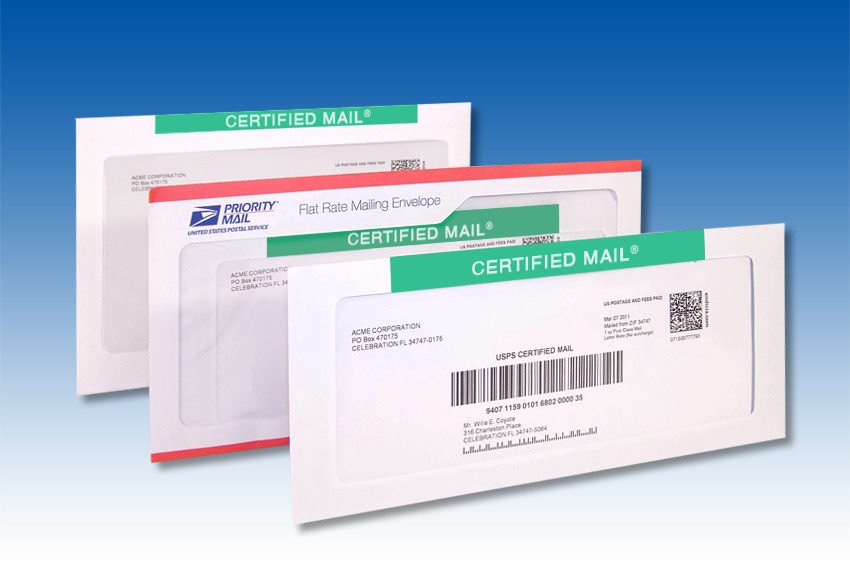
If you send Certified Mail at any kind of volume — legal notices, lease renewals, collections letters, board correspondence, anything where you need legally defensible proof of delivery — there’s a workflow that saves you roughly $1.74 per piece and replaces the green card that gets lost in transit with a PDF signature your inbox keeps forever. It’s called FP eCertified Mail, and we sell every part of it except the postage.
This post is the operator-level walkthrough: what eCertified actually is, what you have to buy from us, how the workflow looks on a real day, and where the savings actually come from.
Certified vs. eCertified — the one-paragraph version
Certified Mail is the green-and-white label you’ve seen for forty years (USPS Form 3800), plus the green return-receipt postcard (Form 3811) that the recipient signs and the carrier mails back to you. The green card is the part that goes wrong — it gets lost, it gets delayed, it comes back illegible, and you’ve already paid $4.65 at the new July 12 rates for the round trip.
eCertified Mail is the same legal instrument — same tracking number, same proof of delivery, same defensibility — with the return receipt delivered as a PDF signature image emailed to you within 24 hours of delivery. No postcard, no waiting, nothing to file. USPS calls this service “Return Receipt Electronic,” and it currently costs $2.91 versus the $4.65 retail green card.
That’s the headline. The rest of this post is the practical part: what to buy and how to send it.
What you actually buy from us
Two things, and only two:
- The CEL43 label form. This is the laser-printer-fed sheet that the eCertified barcode prints onto. Three labels per 8.5×14 legal sheet. You feed them into your office multifunction printer like any other pre-cut label stock. Pack sizes and pricing on the Form CEL43 order page; item number FMCEL43.
- A postage meter, if you don’t have one. The eCertified workflow assumes you’re running First-Class metered postage from an IMI-ready FP machine. Any PostBase model we carry handles it. If you’re still on a non-IMI meter, the IMI explainer covers why that’s the bigger problem.
The FP eCertified portal itself is free. That’s the part most operators don’t realize — you don’t subscribe to anything monthly. You log into fpcertifiedmail.com, you print labels onto the CEL43 form stock, you affix them to envelopes, you run them through the meter. The portal is the manufacturer’s infrastructure; we’re the dealer that gets you onto it and keeps the form stock on your shelf.
What can be Certified this way
The same things you’ve always been able to Certify:
- First-Class letters — the most common use case.
- First-Class flats — anything in a flat-rate envelope or larger.
- Priority Mail — when you need both speed and proof of delivery.
Anything else (Marketing Mail, Media Mail, Ground Advantage) is not Certified-eligible. That’s a USPS rule, not an FP one.
Setting up the FP eCertified portal
Account creation takes a couple of business days — FP verifies you on the back end before activating the portal. Plan accordingly if you’ve got a deadline-driven first job.
- Go to fpcertifiedmail.com and request an account.
- Wait for FP’s activation email. (If it’s been more than two business days, call us — we can poke them.)
- Log in. The portal opens to the Quick Print tab by default; that tab is for printing one label at a time, which is most operators’ day-to-day use case.
Two tabs you’ll spend the most time in once you’re set up:
- Quick Print — single label, fast.
- Selection & Printing — batch from the address book onto a full three-up sheet.
Sending an eCertified piece, end to end
Five steps. Once you’ve done it twice, it’s a 90-second workflow per piece.
Step 1: Fill in sender and recipient
In the Quick Print tab, fill the Sender Address block (yours) and the Recipient block (theirs). The portal saves senders and recipients to an address book — every name you type once is one click next time.
Tip: fill in the Additional Information fields (file number, matter number, internal reference) even if you don’t think you’ll need them. The audit trail is searchable in the Tracking & Digital Signatures tab months later, and the future-you who has to find one specific piece will thank present-you for the file number.
Step 2: Pick postage options
Three fields:
- Weight — in ounces. If your meter has a dynamic scale, this can stay at 1; the meter weighs the real piece at run time and bills accordingly. If you don’t have a dynamic scale, weigh the piece on your bench scale and enter the actual weight.
- Package Type — Letters, Flats, or Priority Mail.
- Electronic Return Receipt — check this box. This is the setting that swaps the green card for the PDF signature and saves you the $1.74 per piece.
Step 3: Print the form
Under Print Options, choose Form Type CEL43. Two shapes:
- CEL43 — Single Form — Left — Rev 05/15 for printing one label from a pre-torn strip. Use this when you only have one or two pieces to send.
- CEL43 — Sheet — 3 Up — Rev 05/15 for filling a full three-up legal sheet. Use this when you’re batching from the Selection & Printing tab.
Load the CEL43 form stock in your office multifunction printer’s legal-size paper tray (8.5×14) and click Print Form. The label comes out pre-formatted with the USPS barcode, sender, recipient, and the certified-mail tracking number.
Step 4: Affix and meter the piece
- Peel the label off the backing.
- Stick it to the top front of the envelope, above the delivery address — same place a Certified Mail label has always lived.
- Feed the envelope into your PostBase meter.
- On the meter touchscreen, select First Class → Letter → Certified → e-Return Receipt and run the piece.
The meter prints metered First-Class postage onto the envelope. The CEL43 label carries the Certified-Mail tracking number and the e-Return Receipt election. The two together are what the carrier scans at induction.
Step 5: Drop and wait
Hand the meter run to your carrier or drop at the blue box. The piece is in USPS’s network as a Certified item, and the recipient’s signature will land in your FP portal within 24 hours of delivery.
Retrieving the signature
Back in the FP portal:
- Open the Tracking & Digital Signatures tab.
- Use the filters under Search for Certified Mail Records — date range, recipient, file number, certified-mail number, whatever you remember. Click Search.
- The Delivery Status column shows where each piece is. When it shows Signature, the cell becomes a hyperlink to a PDF of the recipient’s signature.
- Click it, save the PDF to your case file or matter folder, done.
Important: signatures only stay in the portal for 13 months. Save the PDF locally — or to whatever document management system you already use — the moment delivery happens. Don’t rely on the portal as long-term archive.
For batch reporting, the Print USPS Firmbook Report tab generates the Firm Mailing Book equivalent — pick a date range, select pieces (or all), click Print Firmbook Report. The output is the daily-induction list USPS used to require on paper.
The savings, broken down
Side-by-side per piece, at the current July 12, 2026 rates:
| Line item | Traditional Certified + green card | FP eCertified |
|---|---|---|
| First-Class letter, 1 oz. | $0.82 (stamped) | $0.78 (metered) |
| Certified Mail fee | $5.55 | $5.55 |
| Return Receipt | $4.65 (retail green card) | $2.91 (electronic) |
| Per-piece total | $11.02 | $9.24 |
| Per-piece savings | — | $1.78 |
Two layers stacked: the metered-vs-stamped letter discount (four cents) and the electronic-vs-retail return receipt ($1.74). The dollar figure moves a bit with each USPS rate change, but the structure is durable — USPS has widened both gaps in every recent change.
At 100 Certified pieces a month, that’s $178 a month or ~$2,140 a year — on a workflow change that costs you the price of the CEL43 form stock and ten minutes of training.
At 500 pieces a month (a busy law office, a property-management company, a collections department), it’s $890 a month or ~$10,700 a year.
What the workflow replaces
For comparison — if you’re still doing this the old way:
- Drive (or send someone) to the post office.
- Wait in line.
- Hand-fill PS Form 3800 (the white-and-green strip) and PS Form 3811 (the green return-receipt postcard) at the counter.
- Pay $11.02 per piece, including the $4.65 for the green card you’ll maybe see again in two weeks if nothing goes wrong.
- File the green card when (if) it comes back. Hope it’s signed legibly. Hope it’s not water-damaged.
- Pull the green card out of the filing cabinet six months later when somebody disputes delivery.
eCertified collapses steps 1–3 to “print a label at your desk,” step 4 to $9.24, and steps 5–6 to “save a PDF.” The legal weight is identical — USPS treats e-Return Receipt as equivalent proof of delivery to the green card, and courts have followed.
What it doesn’t do
A few honest limits worth knowing up front:
- It’s still USPS. Delivery times are USPS delivery times. eCertified doesn’t make the mail move faster, it just changes the receipt mechanism.
- The 13-month portal retention is real. Save the PDF locally, immediately, every time. If your audit window is longer than 13 months (most legal/compliance use cases are), the portal is your intake, not your archive.
- Account setup takes a couple of business days. Don’t try to onboard the morning of a deadline.
- You need a working office MFP that handles 8.5×14 legal stock. If your printer can’t feed legal, the CEL43 form won’t print correctly. This catches roughly nobody, but it’s the one hardware prereq.
How to get started
- Order CEL43 form stock. Visit the Form CEL43 order page or email supplies@goldenstatesystems.com. Item number FMCEL43. Pack sizes from 300 forms up to 3,000.
- Request your FP portal account at fpcertifiedmail.com. Couple of business days to activate.
- If you’re not already on an IMI-ready postage meter, that’s the conversation to have first — see the postage-meter lineup or the IMI explainer. The eCertified workflow assumes a current FP machine on the bench.
- Call us if any of the three above feels like the wrong order. (805) 484-3957, or the contact form. We’ll size the form pack to your monthly Certified volume, time the portal activation, and — if needed — quote the meter that makes the rest of it work.
The short version
If you’re paying $4.65 a piece for green return-receipt postcards and making post-office runs to do it, you’re leaving roughly $1.74 per piece on the table and adding hours of operator time per week that don’t need to be spent. FP eCertified is the same legal instrument, retrieved as a PDF from a free portal, printed onto a $0.67-per-label form your office printer already handles.
We’re the dealer that sells you the form, sets up your portal, and keeps the meter running. The savings are USPS’s; the workflow is ours.
(805) 484-3957 — or the contact form. A person reads it.